The internet has fundamentally changed the way human beings connect, communicate, and build relationships. Gone are the days when our social circles were strictly limited to our immediate geographical locations, schools, or workplaces. Today, with just a few taps on a smartphone or clicks on a keyboard, you can engage in deep, meaningful conversations—or just casual banter—with someone sitting thousands of miles away.
From dedicated chat applications and bustling Discord servers to massive multiplayer online games and social media comment sections, chatting with strangers online has become a completely normalized part of modern digital life. It can be an incredibly rewarding experience, offering opportunities to learn about new cultures, practice foreign languages, find a supportive community, or simply pass the time.
However, the inherent anonymity of the internet brings significant risks. The digital veil that allows you to feel comfortable opening up to someone new also allows malicious actors to hide their true identities and intentions. Cyberbullying, phishing scams, catfishing, data theft, and even physical danger are real threats in the digital landscape. Navigating these waters requires a combination of common sense, technical awareness, and a strong set of personal boundaries.
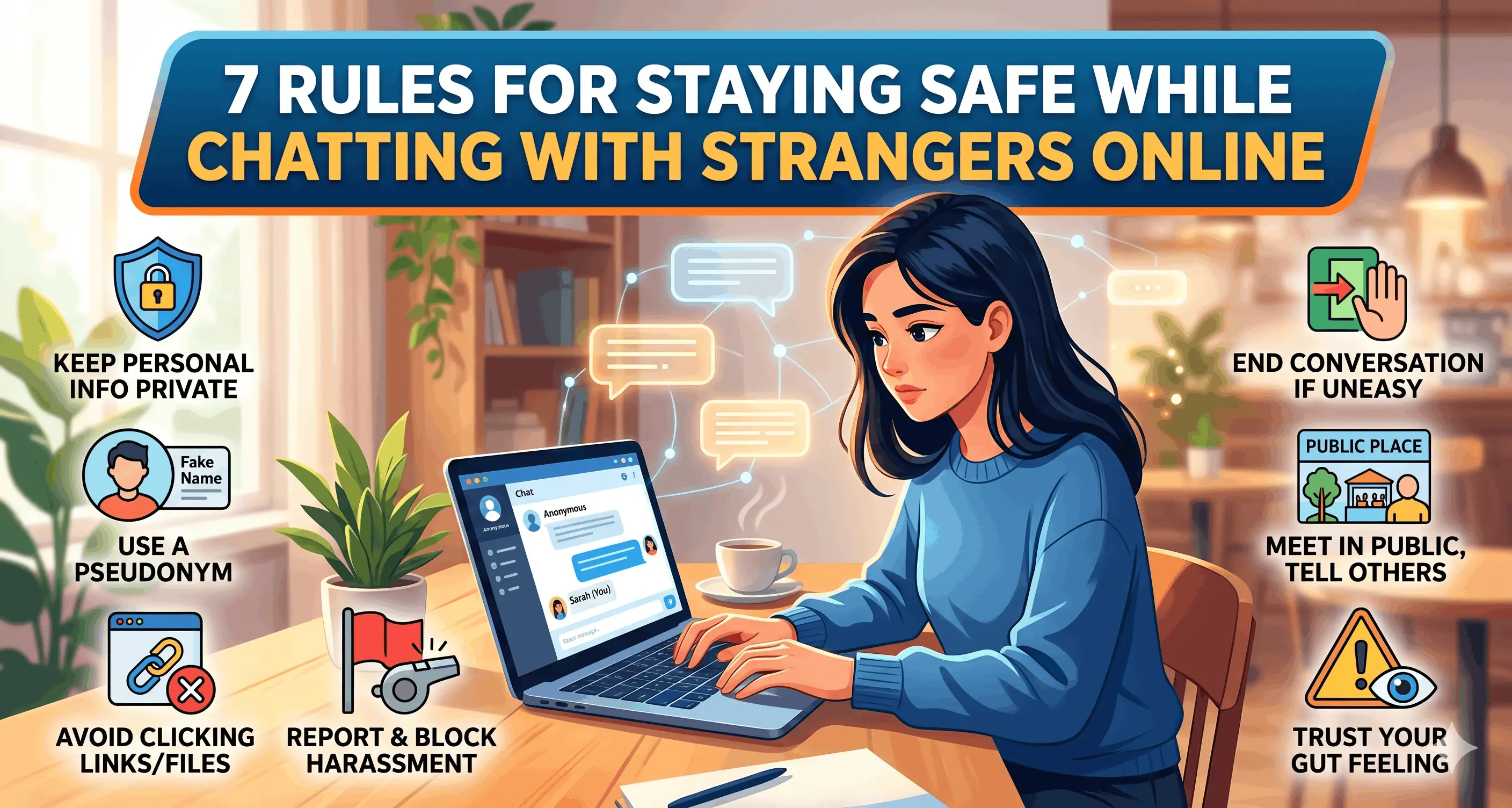
To help you enjoy the benefits of digital socialization without compromising your security, here are the 7 Rules for Staying Safe While Chatting with Strangers Online.
Rule 1: Keep Your Personal Information Strictly Private
The golden rule of internet safety is to guard your Personally Identifiable Information (PII) with your life. When you are chatting with someone you have never met in real life, there is absolutely no legitimate reason for them to know the intimate details of your daily existence.
The Danger of Triangulation Many people understand that they should not hand out their home address or Social Security number. However, people often fall victim to "triangulation." This happens when a malicious actor pieces together seemingly harmless nuggets of information dropped over time to figure out exactly who and where you are.
Actionable Safety Tips:
Never share the basics: This includes your full legal name, home address, phone number, email address, or financial information.
Hide your daily routines: Do not disclose the specific name of your school, your workplace, or the local gym you visit every Tuesday at 6 PM.
Beware of background clues: If you are sharing photos or video chatting, ensure that your background does not give away your location (e.g., mail on a desk, a specific school uniform, or a view out the window showing recognizable local landmarks).
Rule 2: Choose Anonymous Screen Names and Avatars
Your first line of defense in any online chatroom or social platform is the persona you present to the world. Far too many users make the mistake of incorporating their real-life details into their usernames or profile pictures, instantly compromising their anonymity before they even send their first message.
A username like "SarahSmith_NY_98" instantly tells a stranger your first name, last name, the state or city you live in, and your likely birth year. Armed with just this username, a determined individual could easily locate your other social media profiles, your LinkedIn, and potentially your public records.
Actionable Safety Tips:
Be creative with usernames: Choose a screen name that reflects a hobby, an abstract concept, or a favorite fictional character. Combine random words if you have to (e.g., "NeonCoffeeCup" or "GalacticWanderer").
Use avatars instead of real photos: Instead of using a selfie, use an illustration, a landscape, or a digital avatar.
Avoid photo reverse-searching: If you do decide to upload a photo of yourself, make sure it is a unique photo taken specifically for that platform. If you use the same profile picture that you use on your personal Facebook or LinkedIn, a stranger can use Google Reverse Image Search to find your real identity in seconds.
Rule 3: Beware of Phishing Links and Malicious Files
One of the most common ways online criminals exploit chat platforms is by distributing malicious links and files. Because chat interfaces are built for rapid communication, users often let their guard down and click on things without thinking.
A stranger might send you a link claiming it leads to a funny meme, an interesting article, or a cheat code for a game you are playing. In reality, that link could be a phishing attempt designed to steal your login credentials, an IP grabber intended to discover your general geographical location, or a download trigger for malware and ransomware.
Actionable Safety Tips:
Adopt a "zero-trust" policy for links: If a stranger sends you a link, do not click it. If they want you to see a specific YouTube video or read a news article, ask them for the title and search for it manually in your own browser.
Do not accept file transfers: Never download files, documents, or images sent directly through a peer-to-peer chat interface. Malicious software can easily be disguised as a harmless
.jpgor.pdffile.Use link checkers: If you absolutely must verify a link, copy and paste it into a reputable link-scanning service (like VirusTotal) to check for malware signatures before visiting the site.
Rule 4: Never Send Compromising Photos or Videos
The internet is written in ink, not pencil. Once you send a piece of digital media to someone else, you instantly lose all control over where it goes, who sees it, and how long it exists. This rule is especially critical when it comes to intimate or compromising photos and videos.
In recent years, there has been a massive spike in a crime known as "sextortion." This occurs when a scammer poses as an attractive stranger, builds rapid rapport with a victim, and coerces them into sending explicit photos or engaging in intimate acts on a webcam. Once the scammer has the material, they immediately drop the act and threaten to send the photos to the victim's friends, family, and employer unless a ransom is paid.
Actionable Safety Tips:
Keep it clean: No matter how much you think you trust an online friend, never send them anything you would not want printed on the front page of a newspaper.
Understand the tech: Screen-recording software and screenshot tools mean that features like "vanishing messages" (found on apps like Snapchat) provide a false sense of security. Nothing truly vanishes online.
Cover your webcam: When you are not actively using your webcam for a trusted and verified call, keep it covered with a physical slide cover or a piece of opaque tape to prevent unauthorized access by spyware.
Rule 5: Trust Your Instincts and Watch for Red Flags
Humans have evolved a highly tuned sense of intuition to protect us from danger. If you are chatting with someone and something feels "off," it is crucial that you listen to that gut feeling. Manipulators, groomers, and scammers often employ specific psychological tactics to break down your boundaries.
Common Red Flags:
Love Bombing: This involves showering you with excessive affection, compliments, or declarations of deep connection incredibly early in the conversation. It is a tactic designed to make you emotionally dependent on them.
Trauma Dumping: A stranger oversharing highly personal, traumatic stories to force a false sense of intimacy and manipulate your empathy.
Isolating Behavior: If the stranger tries to convince you that your real-life friends or family "don't understand you like they do," they are likely trying to isolate you for manipulation.
Pushing Boundaries: If you say "no" to something (e.g., turning on your camera, giving out your Instagram handle) and they respond with anger, guilt-tripping, or continuous pressure, they are showing you that they do not respect your boundaries.
Rule 6: Use Platform Safety Features Unapologetically
Every reputable chat platform, social media site, and online game comes equipped with built-in safety tools designed to protect its users. However, many people hesitate to use them, worrying that they might seem "rude" or that they are overreacting.
When you are dealing with strangers on the internet, politeness should never supersede your personal safety. You do not owe anyone your time, your conversation, or your digital space.
Actionable Safety Tips:
Embrace the Block Button: The moment a stranger makes you feel uncomfortable, asks inappropriate questions, or sends unsolicited explicit content, block them immediately. Do not engage, do not argue, and do not try to "fix" the situation.
Report bad behavior: If a user is breaking platform rules (e.g., engaging in hate speech, threatening violence, or sending spam), use the report function. This not only protects you but helps protect the wider online community from predatory behavior.
Adjust your privacy settings: Dig into the settings of the apps you use. Disable features that show your "online status," turn off read receipts, and restrict who is allowed to send you a direct message or friend request.
Rule 7: Transition to Real Life Safely (If It Ever Goes That Far)
Sometimes, online friendships genuinely blossom into real, lifelong connections. You might chat with someone for months or years, build immense trust, and eventually decide that you want to meet up in person. While this can be a wonderful experience, the transition from the digital world to the physical world is the point of maximum risk.
"Catfishing"—the practice of creating a fake online persona to trick someone into a relationship—is incredibly common. You must take concrete steps to verify the person is who they say they are before you ever share physical space with them.
Actionable Safety Tips for Meeting Up:
Verify via live video first: Before agreeing to meet, insist on a live video call. Ask them to do something specific (like hold up a certain number of fingers) to ensure the feed isn't a pre-recorded loop. If they constantly make excuses as to why their camera is broken, cancel the meeting.
Meet in a busy, public place: Your first few meetings should be in broad daylight at a populated location, such as a coffee shop or a busy park. Never go to their house, and never invite them to yours.
Tell a trusted friend: Provide a friend or family member with the person's screen name, their phone number (if you have it), the exact location where you are meeting, and the time you expect to be back. Share your phone’s live GPS location with this trusted friend for the duration of the meetup.
Control your own transportation: Drive yourself, take a bus, or use a ride-sharing app. Never let the stranger pick you up or drop you off, as this reveals where you live and takes away your ability to leave immediately if you feel uncomfortable.
Conclusion
Chatting with strangers online doesn't have to be a terrifying endeavor. The internet is filled with fascinating, kind, and brilliant people who are eager to connect. By implementing these 7 rules—guarding your personal information, staying anonymous, avoiding suspicious links, protecting your media, trusting your instincts, utilizing platform tools, and handling real-world meetups safely—you can build a robust digital defense.
Remember that online safety is not about living in fear; it is about empowerment. When you know how to protect yourself, you can navigate the digital world with confidence, enjoy the communities you find, and make genuine connections without compromising your peace of mind. Stay smart, stay vigilant, and chat safely.